Statement of Activities for Nonprofits: A Practical Guide
Nov 7, 2026 · 12 min read

You're looking at a year-end report that shows healthy revenue, yet payroll still feels tight and your board is asking why you can't approve a modest expense. That gap is where a statement of activities earns its keep. It doesn't just list money in and money out. It shows how much arrived with donor instructions, how much became available during the year, and whether your organization's net worth grew.
Table of Contents
- What a Statement of Activities Shows and Why It Matters
- Statement Lines and Their Form 990 Matches
- Accounting Treatments That Change the Numbers
- Build, Check and Tie Out the Statement
- Statement of Activities Template Layout
- A Worked Example From Two Real Filers
What a Statement of Activities Shows and Why It Matters
Think of a household budget with one extra column. A household tracks income and bills. A nonprofit must also track which dollars arrived with strings attached and which didn't.
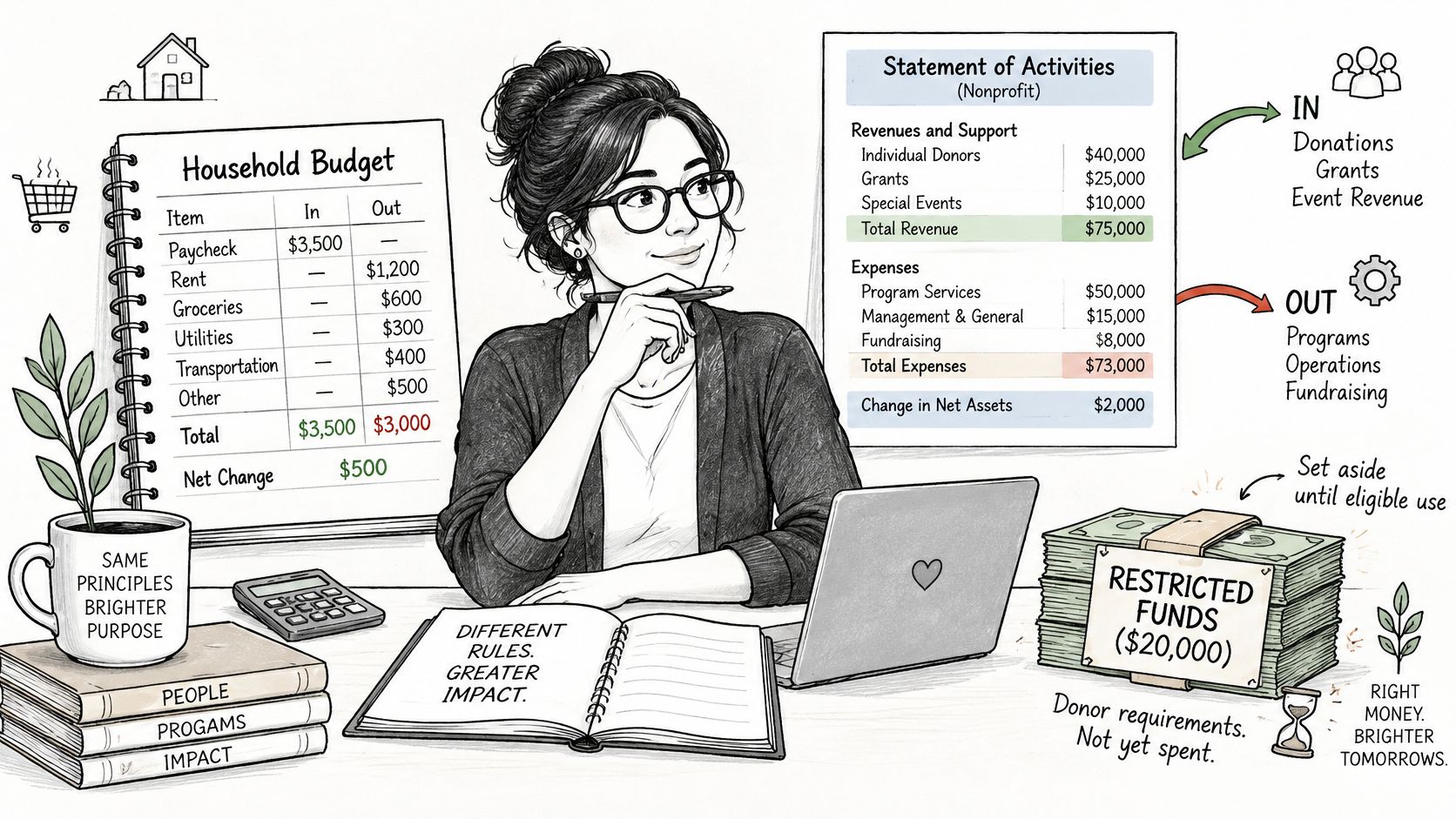
A statement of activities reports the change in net assets for a period. Revenue and gains minus expenses and losses equals that change. It's prepared on an accrual basis, so revenue can appear when it's earned or pledged, not only when cash reaches the bank.
That's different from a for-profit income statement. A business ends with profit that belongs to owners. A nonprofit ends with a change in net worth that may be locked to a donor's purpose and unusable for rent, salaries, or insurance.
The two classes you'll use throughout
- Net assets without donor restrictions: Resources your board can direct to any lawful mission purpose.
- Net assets with donor restrictions: Resources a donor has limited by purpose, time, or both.
The scale is large. In fiscal year 2024, the U.S. nonprofit sector reported $3,923,934,947,783 in total revenue and $3,642,967,494,868 in total expenses, according to CharitySense sector data. Those totals answer three practical questions for any single organization. How much came in? What was spent and on what? Did net assets grow or shrink?
Board members use those answers to judge sustainability. Funders and grant writers use them to judge capacity. Auditors use them to test whether donor conditions were honored.
Pull last year's statement before you go further and find the change in net assets line. Then check how much of that change sits in each net asset class.
That split is the story. A positive total can hide a weak unrestricted result, and a negative total can hide planned spending of money raised earlier.
Statement Lines and Their Form 990 Matches
Every line on the statement should be checkable somewhere on Form 990. If you can't find the match, you don't yet know whether you have a classification problem or a posting problem.
| Statement line | Net asset class | Form 990 location | Tie-out check |
|---|---|---|---|
| Contributions and grants | With or without donor restrictions | Part VIII, lines 1a to 1h | Total matches Part VIII contributions |
| Program service revenue | Without donor restrictions | Part VIII, line 2 | Matches Part VIII line 2 |
| Investment return | Without donor restrictions unless restricted | Part VIII, investment income lines | Matches Part VIII investment lines |
| Net assets released from restrictions | Moves from with to without restrictions | Not a Part VIII revenue line | Ending balances match Part X |
| Program, management and general, fundraising expenses | Without donor restrictions | Part IX, columns B to D | Columns sum to column A |
| Total expenses | Combined | Part IX, line 25 | Equals statement total expenses |
| Change in net assets (revenue less expenses) | Combined | Part I, revenue less expenses | Matches statement change |
Start at the top. Contributions and grants in Part VIII, lines 1a to 1h, should reconcile to contribution revenue on the statement, after you account for items Form 990 treats differently, such as some donated services. Program service revenue belongs on Part VIII, line 2. That's fees for services, admissions, tuition, or contract revenue tied to your mission work, not donations.
Investment return maps to the investment income lines in Part VIII. On audited statements it's often shown net of related fees, so expect a reconciling note if the Form 990 presentation looks more detailed.
The line that won't appear as revenue
Net assets released from restrictions isn't new revenue on Form 990. It is a reclassification inside net assets. You verify it indirectly through Part X, where ending balances for net assets with and without donor restrictions must reflect the releases you recorded.
Expenses are more direct. Part IX separates program services in column B, management and general in column C, and fundraising in column D. Those columns sum to column A, and total expenses must equal Part IX, line 25. That functional split lets readers calculate program expense share or fundraising cost share without guessing.
The IRS logic ties the whole form together. On IRS Form 990, total revenue in Part I must equal Part VIII, column A, line 12, total expenses must equal Part IX, column A, line 25, and revenue less expenses is total revenue minus total expenses. If your statement change in net assets doesn't reconcile to that result, trace the difference line by line instead of adjusting the bottom line.
Private foundations file Form 990-PF instead of the regular Form 990, so their schedules look different. When you're researching those funders, remember that our funder records come from IRS Form 990-PF and Form 990 filings, and each record shows the year it is from. That filing year matters when you compare a funder's giving to your own statement period, a point worth checking during foundation prospect research.
A mismatch in one line usually points to classification, not fraud or a broken ledger. A grant coded as program revenue, or a release coded as a new contribution, will break one tie-out while leaving cash untouched.
Accounting Treatments That Change the Numbers
Revenue does not equal spendable cash. That's the assumption to drop first.
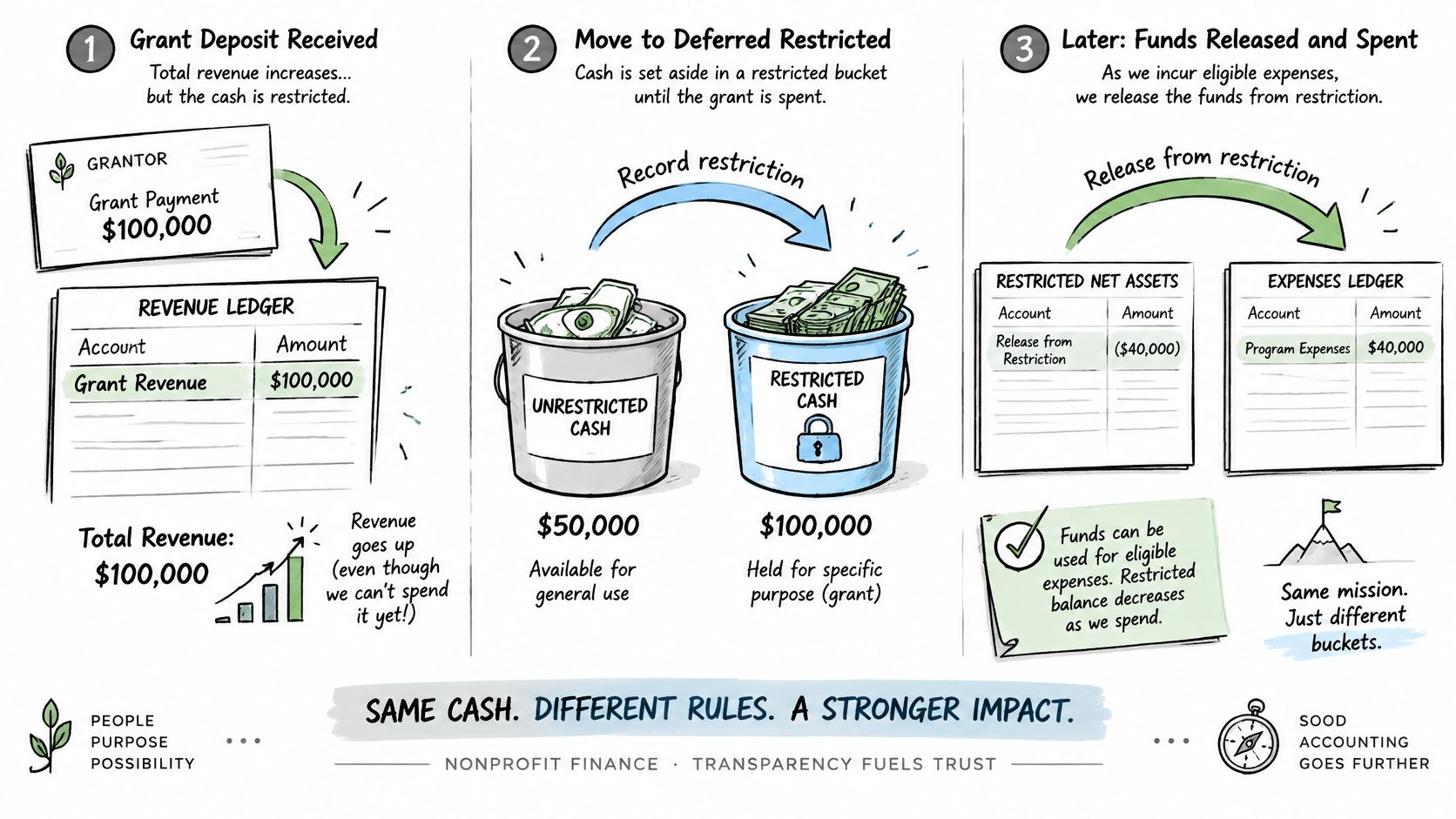
Say a foundation gives you money for a youth program that starts next year. Total revenue may rise now. Your ability to pay this month's electric bill doesn't. The money sits in net assets with donor restrictions until you satisfy the purpose or the time arrives.
| Situation | Treatment | Effect on the statement |
|---|---|---|
| Unrestricted cash gift | Net assets without donor restrictions in the year received | Adds to revenue and unrestricted net assets |
| Gift restricted to a program | Net assets with donor restrictions until the purpose is met | Adds to restricted net assets; release moves it when spent |
| Multi-year pledge with time restriction | Recognized with donor restrictions; released when the year arrives | Revenue appears when pledged; cash may come later |
| Conditional grant with barrier and right of return | Liability until conditions are met | No revenue until conditions are met |
| Board-designated reserve | Stays without donor restrictions | Shown as unrestricted despite the board label |
| Noncash donation such as equipment | Recorded at fair value with an offsetting asset or expense | Raises revenue and expenses by the same amount |
Releases move money between columns
When you spend restricted money on the promised purpose, you don't record the gift as revenue again. You record a release. The with-restrictions column goes down, the without-restrictions column goes up, and the qualifying expense appears in the unrestricted column. Total net assets don't change from the release itself.
Under the FASB illustrative guidance in ASU 2020-07, revenues, gains, expenses, losses, and releases are analyzed by restriction class, and a release is reported as "net assets released from restrictions" when a time restriction expires or a purpose restriction is fulfilled. That's why restricted expenses don't normally appear as expenses of the restricted column.
Watch this short walkthrough if the release entry still feels abstract, then map one of your own grants through the same steps.
Three treatments readers mix up
- Conditional grants: A barrier plus a right of return means you hold a liability, often called a refundable advance, until you meet the condition. Cost-reimbursement grants often work this way.
- Board designations: Your board can set aside an operating reserve, but that decision doesn't create a donor restriction. The money stays without donor restrictions because the board can reverse its own label.
- Noncash gifts: Donated food, equipment, or other goods are recorded at fair value. Revenue and expense or assets can both rise, even though no cash changed hands.
Practical rule: Ask three separate questions for every large grant. Was revenue recognized? Has the restriction been released? Is cash actually available?
If restricted grants are large, don't read this statement alone. Pair it with the statement of financial position for balances, the cash flow statement for cash movement, and the notes for restriction details.
Build, Check and Tie Out the Statement
Build the statement in the order your evidence supports it. Don't start with a template and force numbers into it.
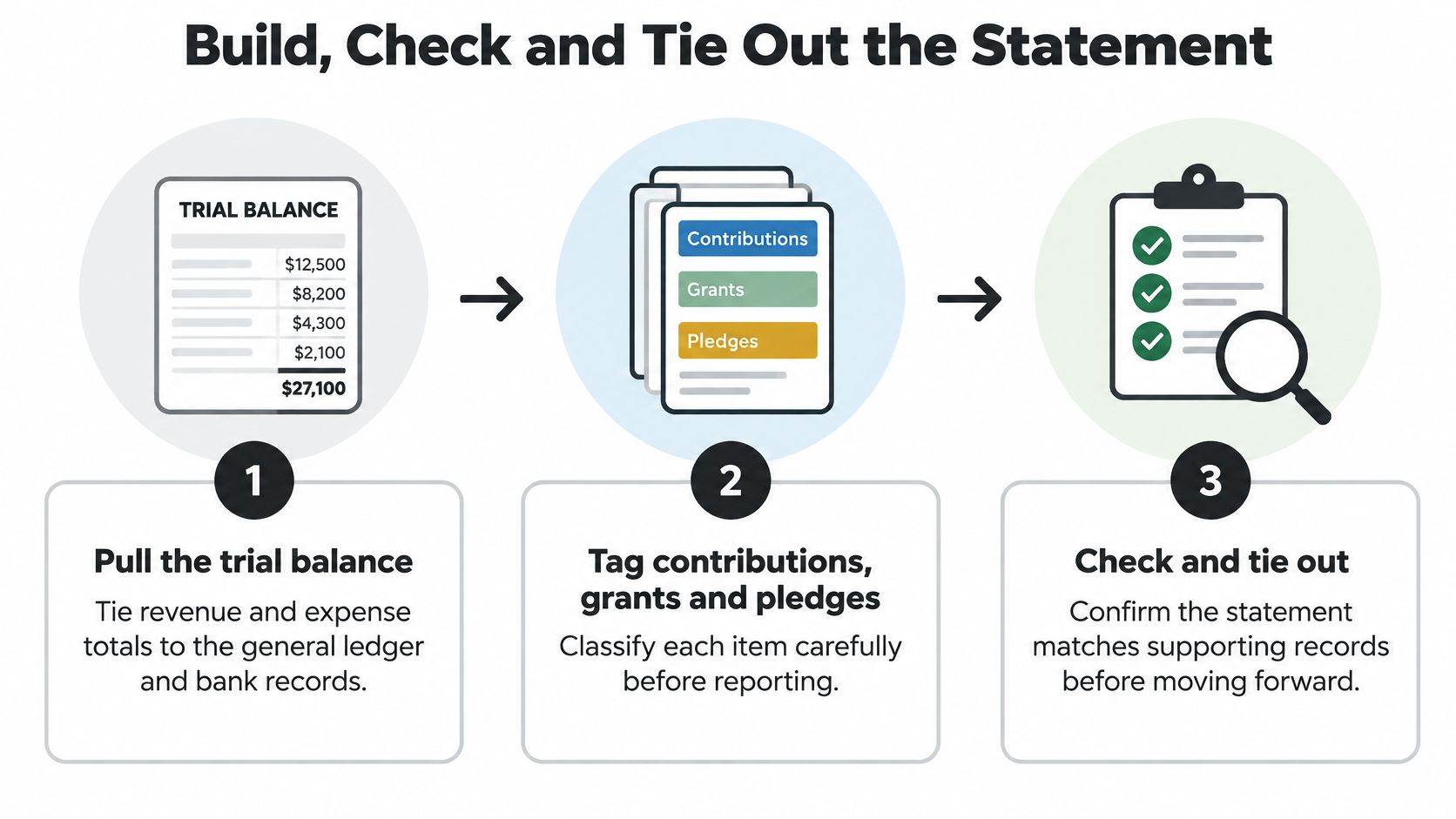
Pull the trial balance. Tie revenue and expense totals to the general ledger first, then to bank records where cash is involved. An error here flows into every later step, so clear uncategorized accounts and stale suspense balances before you format anything.
Tag each contribution, grant, and pledge. Mark it with or without donor restrictions, and note whether the limit is purpose, time, or both. The donor document controls the tag, not your internal nickname for the fund. Common slip: treating a board-designated reserve as donor restricted.
Record conditional grants as liabilities. Keep refundable advances out of revenue until the barrier is met. For a cost-reimbursement award, that usually means recognizing revenue as you incur allowable costs and satisfy the agreement terms.
Post releases only when the restriction is satisfied. Move the amount to net assets without donor restrictions in the period you meet the purpose or reach the specified time. Common slip: releasing a full grant at award because you expect to spend it later.
Allocate functional expenses on a documented basis. Split salaries, rent, insurance, and overhead across program, management and general, and fundraising using time records, headcount, square footage, or another basis you can explain. Common slip: charging every salary to program because everyone's work feels mission related. A clear allocation also strengthens the budget narrative you later build with a grant proposal budget template.
Total each class and compute the change. Add revenue and gains, subtract expenses and losses, and keep the with-restrictions and without-restrictions columns separate until the final total. Releases should net to zero in the total column.
Test the identity before you share it
Run the basic check. Beginning net assets plus change in net assets equals ending net assets. Do it for the total column and for each class. If one class fails, your release entries or restriction tags are the first place to look.
Then tie the statement outward. Revenue should reconcile to Form 990 Part VIII, line 12. Expenses should match Part IX, line 25. Ending net asset balances by class should agree to Part X.
Have a second person run the tie-out from the source documents, not from your spreadsheet. Fresh eyes catch copied formulas and releases that lack a documented condition.
Finish with the notes. Explain board designations, conditional grants not yet recognized, and any large pledge that raises revenue before cash arrives. Readers who research funders through public records will compare those notes with filing data, and Grantlas is built on public records, including IRS Form 990 filings and federal grant listings, so inconsistencies are easier to spot than many small organizations expect.
Keep a tie-out worksheet with the final statement. List each statement line, the ledger accounts behind it, the Form 990 part where it appears, and the initials of the reviewer. Next year, that worksheet becomes your starting checklist instead of a memory exercise.
Statement of Activities Template Layout
Use three columns every time. Without donor restrictions, with donor restrictions, and total. Consistent columns make the release line visible and keep trend reading simple.
| Line | Without donor restrictions | With donor restrictions | Total |
|---|---|---|---|
| Contributions and grants | Enter from trial balance | Enter from trial balance | Sum of both classes |
| Program service revenue | Enter from trial balance | 0 unless donor restricted | Sum of both classes |
| Investment return | Enter from trial balance | Enter if donor restricted | Sum of both classes |
| Net assets released from restrictions | Add release amount | Subtract release amount | 0 |
| Total revenue and gains | Sum of lines above | Sum of lines above | Sum of both classes |
| Program services expenses | Enter from Part IX allocation | 0 in most presentations | Same as unrestricted amount |
| Management and general expenses | Enter from Part IX allocation | 0 in most presentations | Same as unrestricted amount |
| Fundraising expenses | Enter from Part IX allocation | 0 in most presentations | Same as unrestricted amount |
| Total expenses | Sum of expense lines | 0 in most presentations | Sum of expense lines |
| Change in net assets | Revenue minus expenses | Revenue minus releases | Total revenue minus total expenses |
| Beginning net assets | Prior year ending balance | Prior year ending balance | Prior year ending total |
| Ending net assets | Beginning plus change | Beginning plus change | Beginning plus change |
Enter revenue first, sorted by class. Don't net a restricted grant against the expense you hope to incur. Show the grant in the restricted column, then show the release when the condition is met.
The release line should draw your eye. It enters the without-restrictions column as a plus and leaves the with-restrictions column as a minus. In the total column, it nets to zero because no new resources arrived.
Expenses follow in the three functional lines. Restricted expenses are rare in this presentation because expenses are reported after release, so the with-restrictions expense column usually stays at zero. If yours doesn't, check whether you're double counting a release.
Label the template with the fiscal year and filing source, such as audited financial statements or Form 990. Keep the same row order each year. If you want a visual reference before you fill in your own trial balance, compare the layout with sample non-profit financial statements, then replace every descriptive cell with your ledger amount and run the tie-out checks again.
A Worked Example From Two Real Filers
Two small filers show why the bottom line needs context. One finished ahead. One finished behind. Neither result tells you, by itself, whether programs were well run.
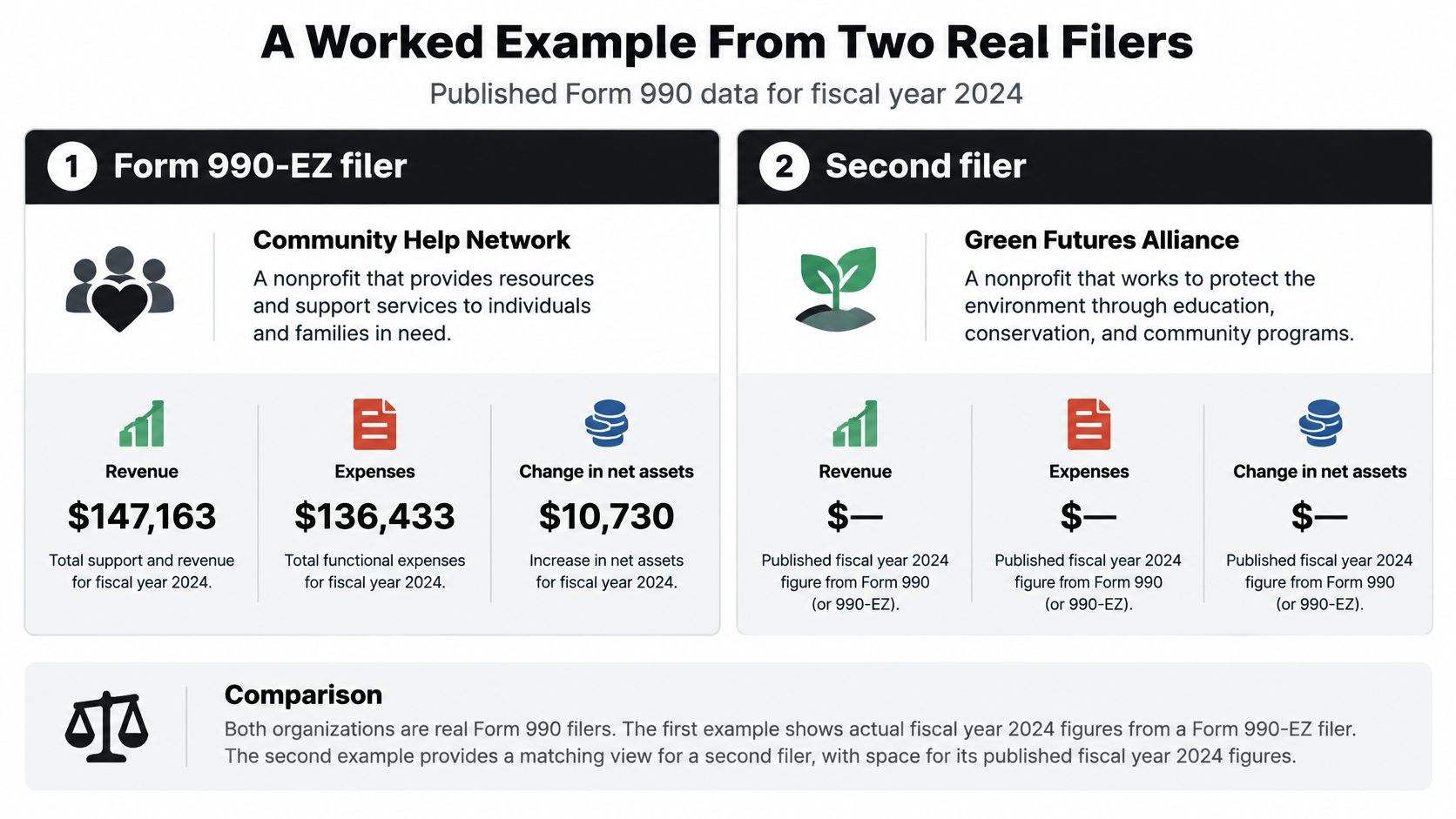
For fiscal year 2024, one nonprofit reported $147,163 in revenue and $136,433 in expenses on its Form 990-EZ, as extracted by ProPublica's nonprofit filing record. Subtract expenses from revenue and you get a change in net assets of $10,730.
For fiscal year 2024, another nonprofit reported $508,487 in revenue and $530,821 in expenses on its Form 990, according to ProPublica's extracted filing data. That's a deficit of $22,334.
Reading the surplus filer
Start with the arithmetic, then ask where the surplus sits. If most of the $10,730 increase came from a restricted grant received late in the year, unrestricted net assets may barely have moved. The organization looks stronger in total, but its flexible resources may not have grown.
A Form 990-EZ filer also gives you less detail than a full Form 990 filer. Some lines appear in simpler form, so you may need internal statements or notes to see the restriction split clearly. Don't invent the split from the totals. Mark it as unknown until you have the underlying statement.
Reading the deficit filer
Now look at the $22,334 deficit. Don't call it program failure yet.
- Planned spend-down: The organization may have raised restricted money in an earlier year and spent it this year. Revenue was recognized earlier, the release and expense landed now, and the current year shows a deficit by design.
- Investment movement: A drop in investment value can pull total revenue and gains down without changing program delivery.
- Timing gaps: A pledge expected in one period and expenses incurred in another can create a temporary mismatch.
Check the release line first. If releases are large, the deficit may show restricted funds being used for their promised purpose. Then check beginning net assets. A healthy beginning balance can absorb a planned deficit. A thin balance cannot.
A deficit explained in the notes or a board memo is a management decision. A deficit with no explanation is a question your board and funders will ask for you.
To rebuild either example in the three-column template, place total revenue and total expenses in the total column first. Then use donor records to split revenue by class, post releases for restrictions satisfied during the year, and place functional expenses in the without-restrictions column. Finally, prove that beginning net assets plus the change equals ending net assets for each class.
Do the same with your own trial balance. If your totals tie to the filing but your class columns don't, the problem is usually tagging or releases, not addition. Fix the restriction record while the grant files are still open, while staff remember what was promised, and before a funder asks you to prove it.
When you're ready to turn a clean statement of activities into a stronger funding pipeline, Grantlas helps you find private foundations and open federal grants that fit your mission, budget, and service area, with a scored shortlist and plain-English reasoning for each match. Build your profile from your website or EIN, review giving history and eligibility flags before you write, and spend your proposal time on funders your financial statements can credibly support.